> ## Documentation Index
> Fetch the complete documentation index at: https://nativecn.mintlify.site/llms.txt
> Use this file to discover all available pages before exploring further.
# Switch
## Overview
`Switch` is a React Native component designed for creating a switch or toggle control. It's built on
top of React Native's [Switch](https://reactnative.dev/docs/switch). It can be customized with Tailwind
classes through the `className` prop.
## Preview
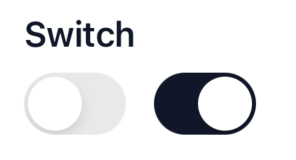
Light mode

Dark mode
```jsx theme={null}
import { Switch } from './components/Switch';
function SwitchDemo() {
const [isEnabled, setIsEnabled] = useState(false);
return
}
```
## Installation
```bash theme={null}
npx nativecn-ui add Switch
```
Include [Switch.tsx](https://github.com/Mobilecn-UI/nativecn-ui/blob/main/components/Switch.tsx) in your project.
Update the import paths to match your project setup.
## Properties
* `className?: string (optional)` - The classes for the switch.
* See React Native's [Switch props](https://reactnative.dev/docs/switch#props)
## Usage
### Basic Usage
Here's how you can use the `Switch` component:
```jsx theme={null}
const [isEnabled, setIsEnabled] = useState(false);
return ;
```